If you are looking for a free streaming app to watch movies and TV shows, you’ve probably come across OnStream. The app has gained popularity because it offers a large content library, HD streaming, subtitle support, and an ad-light experience. However, the questions are related to its safety and legality.
OnStream is generally safe to use if you download it from its official website, but because it is not available through official app stores like Google Play or the Apple App Store, you should always be cautious of fake APKs.
As for legality, the app itself is not illegal, but the legality of streaming specific content depends on whether the content is properly licensed in your country.
In this review, I will explain how OnStream works, discuss its safety and legal considerations, installing it on popular devices, troubleshoot common issues, and help you decide whether it’s the right streaming app for you.
A General Overview of OnStream
| Question | Short Answer |
| Is OnStream safe? | Generally yes if downloaded from the official website, but always scan APKs before installing. |
| Is OnStream legal? | The app itself is legal, but some content sources may not have official licensing depending on your country. |
| Does it cost money? | No. OnStream is free. |
| Ads? | Very few compared to most free streaming apps. |
| Available on Play Store? | No. |
| Available on App Store? | No. |
| Best alternative | Tubi (free) or Netflix (premium). |
What is OnStream?
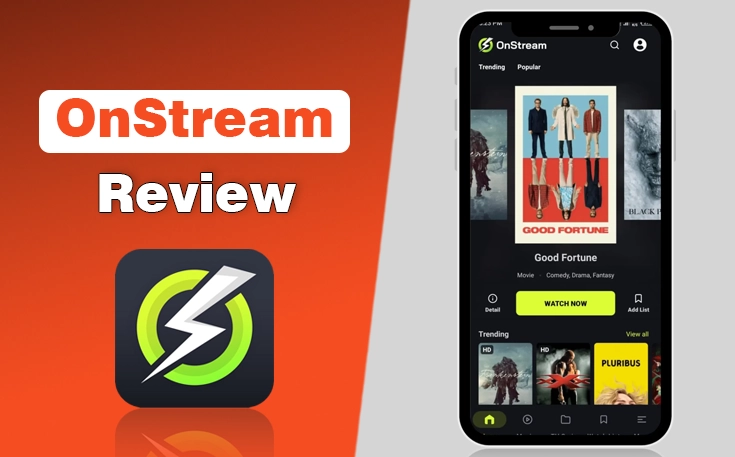
OnStream is a free streaming application that lets users watch thousands of movies and TV shows without purchasing a subscription.
As compared to premium services such as Netflix or Disney+, OnStream does not require users to create an account before streaming, which makes it one of the easiest apps to start using.
The app is designed primarily for Android-based devices, including Android phones, Android TVs, Google TV devices, and Amazon Fire TV products.
It features a clean interface where content is organized into categories such as Trending, Popular, Latest Movies, and TV Series, making it simple to discover something new to watch.
One of the biggest reasons people choose OnStream is its minimal advertising. Many free streaming apps interrupt playback with frequent ads, but OnStream offers a much smoother viewing experience with fewer interruptions.
Is OnStream Safe?
Yes, OnStream is generally considered safe when downloaded from its official source, but users should still exercise caution because it is distributed as an APK rather than through an official app store.
Apps available on Google Play and the Apple App Store go through security and policy reviews before publication. Since OnStream is not distributed through those stores, it doesn’t receive the same level of marketplace verification.
That doesn’t automatically make it unsafe. It simply means users must take greater responsibility for downloading the correct version.
The biggest security risk isn’t usually the official OnStream app itself. It is fake websites that distribute modified APK files containing malware, spyware, or unwanted software.
Before installing any APK, it is good practice to:
- Download only from the official OnStream website.
- Avoid modded or premium unlocked APK versions.
- Scan the APK with a reputable antivirus tool before installation.
- Keep the app updated to receive bug fixes and security improvements.
- Only grant permissions that are necessary for the app to function.
Is OnStream Legal?
The OnStream app itself is simply software, and downloading an app isn’t automatically illegal. However, the legality of streaming content through OnStream depends on whether the movies and TV shows being accessed are properly licensed for distribution in your region.
OnStream doesn’t publicly disclose comprehensive licensing information for every title available through the platform. As a result, users can’t always independently verify whether a particular movie or TV show is being distributed with the necessary permissions.
In the United States, copyright law protects movies and television programs from unauthorized distribution. Streaming copyrighted content from unlicensed sources may violate copyright laws, even if users aren’t downloading the files permanently.
- Because licensing agreements differ between countries, content that may be legally available in one region could be unavailable or restricted in another.
- If you want complete certainty that every title you watch is officially licensed, the safest option is to use established streaming platforms that clearly disclose their content partnerships.
Ultimately, users are responsible for ensuring they comply with the copyright laws applicable in their own jurisdiction.
What are the Key Features of OnStream?
Despite being a free streaming app, OnStream includes several features that make it competitive with many paid services.
| Feature | Details |
| Cost | Free |
| Account | Optional |
| Ads | Minimal |
| Resolution | Up to HD/4K (availability varies) |
| Downloads | Yes |
| Chromecast | Yes |
| FireStick | Yes |
| Roku | Indirect |
- Large Content Library: OnStream offers an extensive collection of movies, TV shows, documentaries, and recently released content across multiple genres. Whether you enjoy action, comedy, drama, horror, or animation, you’ll generally find a wide selection to browse.
- HD Streaming: Many titles are available in HD quality, depending on the source and your internet connection. Playback quality automatically adjusts based on available bandwidth to reduce interruptions.
- Minimal Advertisements: Compared to many free streaming platforms, OnStream displays relatively few ads, creating a smoother viewing experience.
- Subtitle Support: The app supports subtitles for numerous movies and TV series, making content more accessible for viewers who prefer captions or watch international content.
- Simple User Interface: Navigation is straightforward, with categories, search functionality, and personalized recommendations helping users quickly find something to watch.
- Offline Downloads: Certain titles can be downloaded for offline viewing, allowing users to watch content later without an internet connection.
- Continue Watching: OnStream remembers your viewing progress, making it easy to resume movies or TV episodes where you previously stopped.
- No Registration Required: OnStream allows users to start watching without creating an account, reducing setup time and protecting personal information.
I have also compared Onstream vs Netflix across multiple factors, which you should read to understand how both platforms differ from each other.
How to Download OnStream?
Because OnStream isn’t available on the Google Play Store or Apple App Store, you’ll need to install it manually on supported devices through APK files.
The process varies depending on your device, but it generally involves downloading the official APK file and enabling installation from unknown sources.
Before you begin, make sure you:
- Download the latest OnStream APK from the official website.
- Have a stable internet connection.
- Enable installation from unknown sources if required.
- Ensure you have enough storage space on your device.
Tip: Avoid downloading the APK from third-party websites that bundle modified versions of the app. These copies may contain malware or outdated software.
How to Install OnStream on FireStick?
Installing OnStream on an Amazon FireStick takes just a few minutes.
- Open Settings on your FireStick.
- Navigate to My Fire TV > Developer Options.
- Enable Install Unknown Apps (or Apps from Unknown Sources, depending on your Fire OS version).
- Install the Downloader app from the Amazon Appstore if you don’t already have it.
- Launch Downloader and enter the official OnStream download URL.
- Download the latest APK.
- Once the download finishes, select Install.
- Open OnStream and allow any necessary permissions.
You can now access OnStream from your FireStick’s Apps section and begin streaming.
How to Update OnStream on FireStick?
Since OnStream isn’t installed through the Amazon App Store, updates aren’t automatic.
To update the app:
- Visit the official OnStream website.
- Download the latest APK using Downloader.
- Install it over your existing version.
- Your app will update without requiring a complete reinstall in most cases.
If you experience installation errors, uninstall the older version and perform a fresh installation before signing back in (if applicable).
How to Download OnStream on Smart TV?
The installation method depends on your Smart TV’s operating system.
Android TV and Google TV
If your TV runs Android TV or Google TV:
- Download the APK using your TV’s browser or Downloader.
- Enable installation from unknown sources.
- Install the APK.
- Launch the app from your Apps menu.
Samsung and LG Smart TVs
Samsung TVs (Tizen OS) and LG TVs (webOS) don’t support Android APK files. As a result, you can’t directly install OnStream on these devices.
If you own one of these TVs, you can still watch OnStream by:
- Using an Android TV box.
- Connecting a FireStick.
- Casting from an Android phone if supported.
How to Get OnStream on Roku TV?
There is no official OnStream app for Roku. Since Roku doesn’t support Android APK installation, you can’t install OnStream directly on a Roku device. However, some users choose to watch OnStream using screen mirroring from an Android phone or Windows PC.
To do this:
- Enable Screen Mirroring in Roku Settings.
- Connect your Roku and Android device to the same Wi-Fi network.
- Start screen mirroring from your Android device.
- Open OnStream and begin playback.
While this method works for many users, the experience depends on your network quality and device compatibility.
How to Download OnStream on iPhone?
Currently, OnStream isn’t available for iPhone through the Apple App Store. Because iOS doesn’t allow sideloading Android APK files, you can’t install the Android version of OnStream on an iPhone.
If you are an iPhone user, consider using officially supported streaming services available through the App Store or access content through supported web platforms when available.
Pros & Cons of OnStream
Like any streaming application, OnStream has strengths and limitations.
| Pros | Cons |
| Completely free to use | Not available on Google Play Store or Apple App Store |
| Large collection of movies and TV shows | |
| Clean, user-friendly interface | |
| HD streaming for many titles | |
| Subtitle support | |
| Minimal advertisements compared to many free streaming apps | |
| No mandatory account registration | |
| Supports Android phones, Android TV, and FireStick |
Why Is OnStream Not Working?
If OnStream isn’t working properly, the problem is often related to your internet connection, an outdated app version, or temporary server issues.
Here are the most common problems and their solutions.
1. Buffering
If videos constantly buffer:
- Restart your router.
- Switch to a faster Wi-Fi connection.
- Reduce other devices using your network.
- Try streaming during off-peak hours.
2. App Keeps Crashing
If OnStream closes unexpectedly:
- Restart your device.
- Update to the latest version.
- Clear the app cache.
- Reinstall the application if necessary.
3. Black Screen
A black screen usually indicates:
- Temporary server issues.
- Corrupted installation files.
- An outdated APK.
Installing the latest version often resolves this problem.
4. Movies Won’t Play
If content refuses to load:
- Check your internet connection.
- Try another title.
- Restart the app.
- Wait and try again later if the streaming servers are experiencing high traffic.
5. Subtitle Issues
If subtitles don’t appear:
- Enable subtitles within the player.
- Restart playback.
- Select another subtitle language if available.
Best OnStream Alternatives
If OnStream doesn’t meet your streaming needs due to app availability, stability, or content limitations, several reliable alternatives are available.
- Tubi is the best free option
- Netflix offers the most comprehensive premium streaming experience.
For a detailed comparison of the top alternatives, check out our complete guide to Apps Like OnStream.
Final Thoughts
OnStream has become one of the more popular free streaming apps due to its clean interface, extensive content library, HD playback, subtitle support, and minimal advertising.
It is particularly appealing to Android and FireStick users who want an easy-to-use streaming app without paying a monthly subscription.
From a security perspective, the official OnStream app appears generally safe when downloaded from its official website, but users should remain cautious of fake APK files distributed through unofficial sources.
Since the app isn’t available through major app stores, verifying the download source is essential.
People Also Ask
What is OnStream app?
OnStream is a free streaming app that allows users to watch movies and TV shows on Android-based devices without requiring a paid subscription.
Is OnStream app safe?
The official OnStream app is generally considered safe when downloaded from its official website. However, users should avoid unofficial APK sources and always scan downloaded files before installation.
How to download OnStream on FireStick?
Install the Downloader app, enable installation from unknown sources, download the latest OnStream APK from the official website, and complete the installation.
How to download OnStream on Roku?
There isn’t an official Roku version of OnStream. Most users access it through Android screen mirroring rather than installing the app directly.
Does OnStream require registration?
No. OnStream allows users to stream content without creating an account.
Is OnStream available on Google Play Store?
No. OnStream isn’t currently listed on the Google Play Store, so Android users must install it manually using the APK file.
Is OnStream legal in the USA?
The app itself isn’t inherently illegal. However, the legality of streaming specific movies or TV shows depends on whether the content is properly licensed for distribution in the United States.
Why does OnStream keep buffering?
Buffering is usually caused by a slow internet connection, network congestion, outdated app versions, or temporary server issues.
Need custom app with amazing features?
Get a Quote