
TikTok Shop sellers need videos that show a product quickly and make its main benefit easy to understand. But filming every product demonstration can take time, especially when a store needs multiple versions for different products or audiences.
Seedance 2.5 on Pollo AI gives sellers a way to turn product images and simple ideas into video scenes. It can create longer sequences, use multiple reference files, and edit specific parts of a generated video.
What Is Seedance 2.5 on Pollo AI?
Seedance 2.5 is an AI video generation model from ByteDance. It can create videos from text or images and is designed to handle longer, more detailed scenes for your videos on TikTok.
Seedance 2.5 on Pollo AI is available directly as a video generation model. Users can choose any of the following from the Pollo AI interface:
- Text-to-video
- Image-to-video
- Upload references
- Write a prompt
- Generate the video
The model supports native 30-second generation and can use up to 50 multimodal references.
The Pollo AI integration is useful because Seedance 2.5 is not sitting on its own. Pollo AI also has tools for product videos, TikTok ads, UGC ads, and other marketing content. A seller can therefore use Seedance 2.5 for a specific video while keeping other product-video work in the same platform.
For a TikTok Shop seller, that can be more practical than switching between different tools for generation and marketing content.
Why Create TikTok Shop Videos with Seedance 2.5 on Pollo AI?
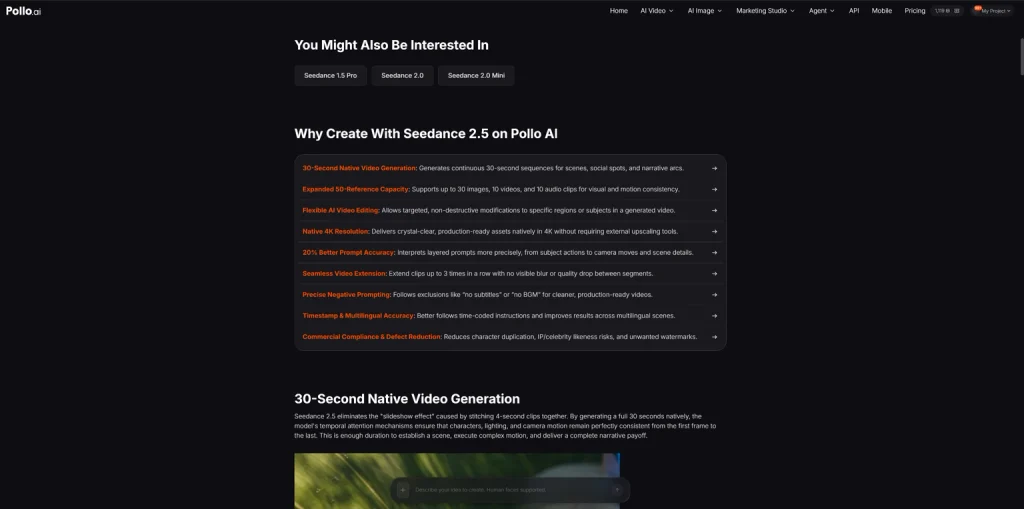
Product videos often need more than one quick shot. A seller may want to show the product, demonstrate how it works, and then show the result.
Seedance 2.5 can generate a native 30-second video, which gives enough room for this type of sequence. It can also use multiple images, videos, and audio references, which is useful when one product photo does not provide enough information.
The Pollo AI setup is also useful for sellers to make different types of marketing videos from the same product assets. For example, Steve AI video generator is another video creation tool available on Pollo AI that can fit into a broader content workflow.
Seedance 2.5 can handle the main generation, while other Pollo AI tools can be used for related marketing tasks.
How to Create a TikTok Shop Product Video with Seedance 2.5?
In the under section, I have provided a complete step by step guide to create TikTok Shop product videos with Seedance 2.5.
1. Upload a Clear Product Image
Open Seedance 2.5 on Pollo AI and choose image-to-video if the product already has a good image. Use text-to-video when the scene needs to be created mainly from a written description.
Use a clear image of the actual product. Avoid blurry screenshots, heavily compressed marketplace images, or photos where important parts are hidden.
There is also no need to upload every product image at once. Start with one strong image and add other references only when they provide useful information, such as another angle or a lifestyle setting.
2. Write a Simple Product-Focused Prompt
Tell Seedance 2.5 what the product should do and what the camera should show.
For example:
“A traveler prepares a smoothie in a hotel room using the portable blender. Show the blender on the table, then the fruit being added and the blender running. Move to a close-up during blending and finish with the smoothie beside the product. Natural light, realistic lifestyle video, vertical format, keep the product shape and colors consistent. No subtitles or text overlays.”
Avoid vague prompts such as “make a viral TikTok ad.” They leave too much to the model.
It is better to focus the video on one selling point, such as portability, ease of use, or the final result to build a brand on TikTok.
3. Generate and Check the Video
Generate the video in Pollo AI and check the result before making more versions.
- Pay particular attention to the product.
- Does its shape stay the same?
- Are the colors and packaging correct?
- Do hands interact with it naturally? Does the main product action happen early enough?
If unwanted text or subtitles appear, add instructions such as “no subtitles” or “no text overlays” to the prompt. Seedance 2.5 supports negative prompting for this type of control.
4. Edit Problems Instead of Starting Again
If most of the video works but one element is wrong, targeted editing can be more useful than regenerating the whole scene.
Seedance 2.5 supports local editing for elements such as props, backgrounds, and clothing.
This is useful for small changes, but product details still need to be checked. AI editing can make a package or product feature look realistic while changing its actual appearance.
For important packaging text, product specifications, or prices, it is safer to add the correct information during final editing.
5. Check It Against the Product Listing
Before publishing, compare the video with the actual TikTok Shop listing.
Make sure the color, size, features, packaging, and use shown in the video match the real product. This matters more for a product video than whether the footage simply looks polished.
Captions, voiceover, music, and a call to action can then be added as needed.
What to Avoid When Creating TikTok Shop Videos?
Do not give Seedance 2.5 a completely open-ended brief. A simple product action usually produces a more useful result than a prompt packed with marketing language.
Also, avoid adding references just because the model supports many of them. Seedance 2.5 can accept up to 50 multimodal references, but unrelated images can make the result less consistent.
Most importantly, check the generated product carefully. AI video can create details that look convincing but are not actually part of the product. To get a better idea, you can visit our guide on creating viral TikTok campaigns using AI.
Final Thoughts
Seedance 2.5 on Pollo AI combines Seedance 2.5’s video generation capabilities with Pollo AI’s broader video and marketing tools. For TikTok Shop sellers, it can turn existing product images into product demonstrations without requiring every scene to be filmed from scratch.
The simplest workflow is to upload a clear product reference, describe one useful product scenario, generate the video, fix obvious problems, and check the final result against the real listing before publishing.
Need custom app with amazing features?
Get a Quote