Managing multiple social media accounts can quickly become overwhelming. From planning content to publishing posts at the right time, consistency is the biggest challenge for marketers, bloggers, and businesses.
That’s where social media scheduling tools come in handy for bloggers.
These tools allow you to plan, automate, and analyze your content strategy, helping you save time and improve engagement. In fact, modern tools go beyond scheduling, they offer analytics, collaboration features, and AI-powered recommendations to maximize your social media marketing ROI.
In this guide, I’ve listed the 10 best social media scheduling tools in 2026, including their features, pros, cons, and prices.
What Are Social Media Scheduling Tools?
Social media scheduling tools are platforms that let you schedule posts in advance across multiple social media platforms like Facebook, Instagram, LinkedIn, and TikTok.
Instead of posting manually every day, you can:
- Plan weeks or months of content
- Maintain consistency
- Focus more on strategy and engagement
These tools streamline workflows, reduce repetitive tasks, and improve overall efficiency.
Top 10 Social Media Scheduling Tools for Bloggers
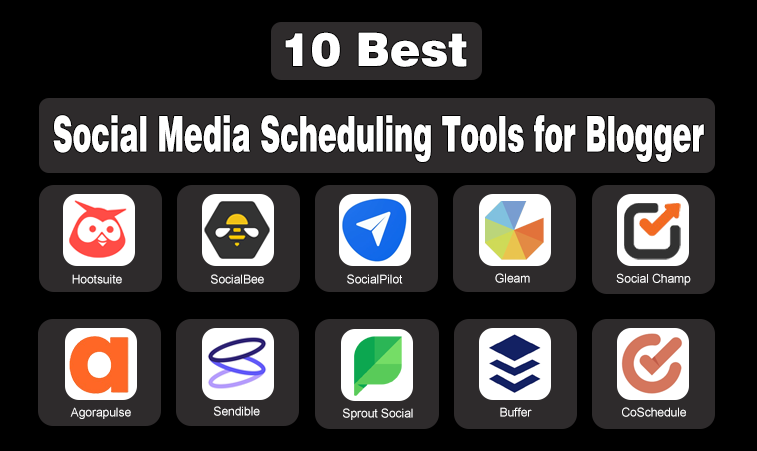
To save your valuable time, I have made a list of the top 10 social media scheduling tools:
1. Hootsuite
You are a beginner and facing the issue in using them due to the complexity in the design of such tools, which makes them difficult to use. Then, Hootsuite is the best pick for you because it comes with a smooth interface that allows users to use it easily.
Key Features:
- AI caption generation
- Multi-platform scheduling
- Content calendar
- Social inbox for messages
- Bulk scheduling
Pricing:
- Standard:$149 per month
- Advanced: $399 per month
| Pros | Cons |
|---|---|
| Post Scheduling | Costly |
| User-friendly Interface | |
| Content Calendar View | |
| Mobile App | |
| Security Features |

2. SocialBee
You are tired of daily posts on your social media. To get rid of that, you can check out SocialBee. which allows you to schedule your posts in the content calendar, so you do not have to manage your digital platforms. It automatically uploads the posts according to the content calendar. Moreover, it gives a 14-day trial for $0.
Key Features:
- Category-based scheduling
- Content recycling
- Analytics tools
- Multi-platform posting
- AI content generation
Pricing:
- Bootstrap:$29 per month
- Aclerate:$49permonth
- Pro:$99 per month
| Pros | Cons |
|---|---|
| Organize Content | No Social Inbox |
| Content Category | |
| Multiple Platform | |
| Customized Formates | |
| RSS Feed Integration |
3. SocialPilot
SocialPilot comes with the feature of an automated post scheduler that helps you to post your ads or videos on your social media channel, ensuring publishing on peak engagement times. With this, you can attract more customers and gain more attention in the digital world.
Key Features:
- Post scheduling & automation
- Bulk scheduling (CSV upload)
- Content calendar
- AI caption generator
- Analytics & reporting
Pricing:
- Essential:$30 per month
- Standard:$50 per month
- Premium:$100 per month
- Unlimited:$200 per month
| Pros | Cons |
|---|---|
| Affordable Pricing | Instagram Auto-Post Restrictions |
| Different Platform Support | |
| Team Collaboration | |
| Content Curation Tools | |
| Analytics |

4. Gleam
Not all social media tools are focused on scheduling—some are built to boost engagement and audience growth. Gleam is a powerful tool designed especially for bloggers and marketers who want to grow their audience through interactive campaigns.
Key Features:
- Helps you run social media contests and giveaways
- Encourages users to like, follow, and share content in exchange for entries
- Easy-to-use campaign builder with customizable rules and rewards
- Supports multiple platforms beyond just one social media channel
Pricing:
- Pro plan: $119
- Business plan: $479
- Premium plan: $1199
| Pros | Cons |
|---|---|
| Great for audience growth | Not a scheduling tool (used alongside schedulers) |
| Drives real engagement | |
| Easy campaign setup |

5. Social Champ
If you’re looking for an easy-to-use social media scheduling tool that balances affordability with solid features, Social Champ is a great pick. It offers post-scheduling, automation, analytics, and team collaboration, making it one of the strongest Buffer alternatives in the market.
Key Features:
- Post scheduling & automation
- Content recycling
- Analytics dashboard
- Team collaboration
- Bulk upload
- Multi-platform publishing
Pricing:
- Starter $4 per profile (Billed Yearly)
- Growth $8 per profile (Billed Yearly)
| Pros | Cons |
|---|---|
| Post Scheduling | Limited advanced features compared to enterprise tools |
| Affordable Plans | Smaller app integrations |
| Content Recycling | |
| Team Collaboration | |
| In-depth Analytics |

6. Agorapulse
Looking for a tool that allows you to collaborate with different teams? Agorapulse is the best option for you then. It features a social inbox that enables different teams to collaborate, develop strategies, and perform bulk scheduling. It allows the new user a 30-day demo on all plans.
Key Features:
- Unified social inbox
- Advanced analytics
- Bulk scheduling
- Team collaboration
- CRM for audience tracking
- Reporting tools
Pricing:
- Free:$0 per month
- Standard:$79 per month
- Professional:$119 per month
- Advanced:$149 per month
| Pros | Cons |
|---|---|
| Clean Interface | Limited Features on Lower Plans |
| Powerful Analytics | |
| Reports | |
| Inbox Monitoring | |
| Team Collaboration Tools |

7. Sendible
Sendible is the best tool for social media management for you if you want to manage multiple online platforms and work on a large scale, like agencies. It comes with multiple features that help you launch campaigns on a large scale, grow a targeted audience, attract customers, and achieve your business goals. It comes with a 14-day free trial.
Key Features:
- Multi-platform scheduling
- White-label dashboards
- Advanced reporting
- Content calendar
- Client management tools
- Campaign management
Pricing:
- Creator:$29 per month
- Traction:$89per month
- Scale:$199 per month
- Advanced:$299vper month
- Enterprise:$750 per month
| Pros | Cons |
|---|---|
| All‑in‑one dashboard | Higher cost for full features |
| Advanced Reporting Features | |
| White‑label dashboards | |
| Multi Scheduling | |
| Mobile app support |

8. Sprout Social
You want some more features than the basic ones that all tools have. Sprout Social is one of the tools that comes with features that help you in understanding your targeted customers and reusing your old videos and ads with creative ideas that lead your business to the next level. You can try its demo for 30 days.
Key Features:
- Smart scheduling
- Social listening
- AI automation
- Advanced analytics
- Team collaboration
- Customer engagement tools
Pricing:
- Standard:$199 per month
- Professional:$299 per month
- Advanced:$399 per month
| Pros | Cons |
|---|---|
| Publishing Time | Scheduling limitations |
| Smart Inbox | |
| Team Work | |
| Support iOS and Android | |
| Automation |

9. Buffer
Buffer is the only one that allows you the best scheduling for ads, videos, and posts on different social media apps for free to attract the desired people and achieve your marketing goals. Try it without paying a single penny, and you can upgrade to premium versions for more features.
Key Features:
- Easy post scheduling
- Content calendar
- AI content assistant
- Basic analytics
- Landing page builder
- Multi-platform posting
Pricing:
- Free:$0 per month
- Essential:$6 per month
- Team:$12 per month
| Pros | Cons |
|---|---|
| Free plan | Image or video quality issues |
| Budget Friendly | |
| Instagram support | |
| Built‑in analytics | |
| Content creation |

10. CoSchedule
While most social media scheduling tools focus on enabling cross-platform campaigns, some allow this, like CoSchedule. This feature allows you to market across all social channels, and you can also ensure a comprehensive scheduling calendar. It also creates analytics of the campaigns that will help you in featuring upcoming events.
Key Features:
- Marketing calendar
- Social scheduling
- AI content assistant
- Workflow automation
- Campaign management
- Performance analytics
Pricing:
- Free Calendar: $0 per month
- Social Calendar:$19 per month
- Agency Calendar:$59 per month
| Pros | Cons |
|---|---|
| Optimized Social Messages | Interface |
| AI-Powered Assistant | |
| Automation | |
| Marketing Calendar | |
| Free Starter Plan |

How to Choose the Right Tool
When selecting a tool, consider:
- Budget (free vs premium)
- Team size
- Platforms you use
- Need for analytics or automation
Simple tools like Buffer are great for beginners, while advanced platforms like Sprout Social or Hootsuite are better for teams.
Final Thoughts
Social media scheduling tools are essential for saving time, staying consistent, and growing your online presence on social platforms. The right tool depends on your needs, whether it’s advanced analytics, ease of use, or audience growth.
If you want powerful analytics and enterprise-level features, tools like Sprout Social or Hootsuite are strong choices. For simplicity and affordability, Buffer and SocialPilot are great starting points. And if your goal is to actively grow your audience, adding a tool like Gleam alongside your scheduler can give you a competitive edge.
Ultimately, there’s no one-size-fits-all solution. The best approach is to choose a tool that aligns with your goals, budget, and workflow, and then use it consistently.
Need custom app with amazing features?
Get a Quote