Hey Galaxy Users!
Tired of boring photos and guesswork? Skip the third-party filters and tape measures! Your Galaxy already has the tools.
If you’re using the latest Galaxy S23 or a trusty older model, there’s a secret weapon hiding in your phone – one most Samsung users overlook. Meet AR Zone App, Samsung’s buried gem for augmented reality magic.
Most Samsung users are not aware of “What is AR Zone?” AR Zone has brought many amazing features with augmented reality integration for Galaxy users.
In this guide, I will go through all about what is AR zone on Samsung, how it works, its features, benefits, and availability in devices.
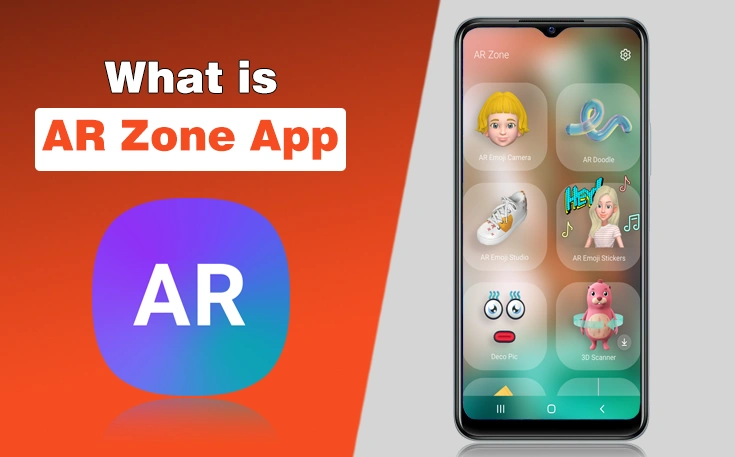
What is AR Zone App?
AR Zone is a pre-installed Samsung app that offers augmented reality features like AR Emoji, Doodle, and Quick Measure.
The AR Zone app is primarily used for augmented reality (AR) features on Samsung Galaxy devices. The app allows users to interact with virtual objects and scenes overlaid on the real world through the phone’s camera.
Here is what the AR Zone app is used for:
- AR Emoji – Create 3D avatars.
- AR Doodle – Draw animated sketches in real-world scenes.
- Quick Measure – Measure objects using your camera.
- Deco Pic – Add stickers & effects to photos/videos.
- Home Decor – Visualize furniture in your space.
Hence, it is a user-friendly and easy-to-use app to enjoy a 3D or Augmented reality experience on your mobile phone.
How Does AR Zone App Work?
AR Zone Samsung app tracks the motions, movements, and items in the background, then uses the camera and sensor to provide an augmented reality experience. It works as:
- First recognize the image: The app uses the camera to recognize the visual information.
- Tracks the motions: It tracks the motions, steps, and background items to turn these things into virtual objects.
- Drawing digital content: lastly, the app makes these things into digital content.
One of the best things is that you don’t need to first record a video and then edit it, like add filters, customizations, and animations, as it automatically adds digital visuals of AR during capturing pictures or recording videos. That’s why it is also counted among the best Samsung apps you can download.
Examples:
With AR Zone, you can:
- Measure your desk in seconds (no math required).
- Test paint colors on your walls (no mess).
- Turn your pet into a dancing sticker (yes, really).
What are the AR Zone Features?
AR Zone app has various features and functions that add fun to your pictures and videos. Here are details about the key aspects that can allow you to pocket the key AR Zone app uses:
1 – AR Emoji Camera & Studio
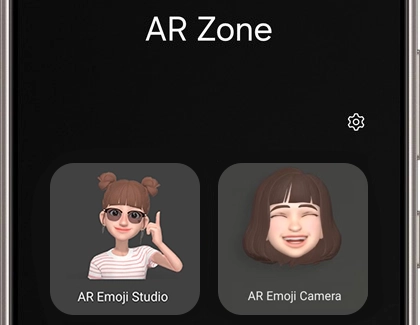
AR Emoji Camera is a fun feature of the AR Zone app to create a personalized 3D avatar that mirrors your facial expressions and movements.
- AR Emoji Camera: Capture a selfie, and the app generates a digital avatar resembling you.
- AR Emoji Studio: You can customize your avatar’s facial features, hairstyles, outfits, and accessories to make it uniquely yours.
These avatars can be used in photos, videos, and even set as call backgrounds or lock screens.
2 – AR Doodle
If you are a Samsung user and want to know, “What is AR Doodle on my phone?” remember that it also adds fun during recording videos or capturing photos. This feature is perfect for adding a personal touch to your photos and videos.
Draw in 3D space using your camera:
- It creates Sketch animated doodles that stick to faces or the environment, moving as you do.
- Choose from various brushes, colors, and effects to enhance your creativity.
3 – Quick Measure
Quick Measure lets you measure objects and distances in real-time using your mobile camera.
- Point your camera at an object, and the app provides instant measurements of height, width, and depth
- Ideal for DIY projects, home improvements, or when you need quick measurements on the go.
Note: This feature requires a device equipped with a DepthVision camera.
4 – Deco Pic
Enhance your photos and videos with fun stickers and effects:
- Choose from a variety of animated stickers, frames, and filters to decorate your images.
- Great for creating engaging content for social media or sharing with friends.
5 – Home Décor
AR Zone App Home Decor visualizes furniture and décor items in your space before making a purchase:
- With this feature you can place virtual sofas, chairs, or tables in your room using AR to see how they fit and look.
- Also, you can see how your furniture adjusts placement and size virtually to make informed buying decisions.
6 – 3D Scanner
3D Scanner is only available on select devices like the Note10 and S20, this feature allows you to:
- Scan real-world objects and create 3D models.
- Use these models as characters in your videos, adding a unique touch to your content.
How to Use AR Zone?
To use AR Zone on your Samsung Galaxy device:
- Open the camera App on your Galaxy mobile phone.
- Tap on MORE.
- Select AR ZONE to explore the available features like AR Doodle, AR emoji, Quick Measure, etc.
- Now, follow the instructions given on your mobile screen.
Alternatively, you can find the AR Zone app in your app drawer.
What are the Devices on Which AR Zone is Available?
AR Zone is available on most Samsung Galaxy devices that support augmented reality, but its availability depends on your device model and the version of One UI installed. While earlier versions of One UI include AR Zone as a dedicated app, Samsung has gradually reorganized its AR features in newer software updates.
| One UI Version | AR Zone Availability |
|---|---|
| One UI 2.1 | Available as a dedicated AR Zone app |
| One UI 3 | Available with AR Emoji, AR Doodle, Quick Measure, and other features |
| One UI 4 | Available with improved AR features and performance |
| One UI 5 | Available on most supported Galaxy devices |
| One UI 6 | Available, though some features may vary depending on the device model |
| One UI 7 | The standalone AR Zone app is no longer included on many devices. Several AR features have been moved into separate Samsung apps or integrated directly into the Camera app. |
Which Samsung Devices Support AR Zone?
AR Zone is commonly supported on compatible Galaxy smartphones and tablets, including:
- Galaxy S Series (S10 and newer)
- Galaxy Note Series (Note10 and newer)
- Galaxy Z Fold and Z Flip series
- Many Galaxy A series models with ARCore support
- Selected Galaxy tablets running compatible versions of One UI
Note: Feature availability varies by device model, region, hardware capabilities, and software version. If you don’t see the AR Zone app on a device running One UI 7 or later, it’s likely because Samsung has integrated its AR tools into other apps rather than providing a separate AR Zone hub.
What are the Benefits of AR Zone?
Augmented Reality Zone app is not just a normal it adds fun and creative things to improve how you use your smartphone. Here’s more to know:
1- Creative Self-Expression
The app helps to become a creative person, as its features AR Emoji and AR Doodle let you personalize your photos and videos with animated avatars and drawings. You can create unique content for social media, messages, or personal fun.
2- Personalized Digital Avatars
AR Emoji Camera turns your face into a 3D animated avatar that mimics your expressions. You can use these emojis in stickers, call screens, and even videos for a fun and engaging communication experience.
3- Practical Utility Tools
Quick Measure allows you to measure objects and distances using your phone’s camera—handy for DIY, shopping, or home projects. It eliminates the need for a physical measuring tape in many situations.
4- Home Visualization
Home Décor lets you see how virtual furniture and decor will look in your actual room before you buy. It is the best feature that helps avoid mistakes when you shop for home items, as you can spatial preview.
5- Enhanced Photos and Videos
Another benefit of using AR Zone is that you can add animated stickers, effects, and overlays to your photos with Deco Pic. It gives your content a more dynamic and engaging appearance.
6- Interactive AR Experiences
The app provides an interactive AR Experience as it features Picture Link allows you to attach digital content to real-world objects. It is best for presentations, educational setups, or just for fun.
7- Kid-Friendly Fun
Yes, it is one of the engaging and entertaining apps for kids. Kids always enjoy making funny stickers, 3D visuals, doodles, and many more. So, it provides fun and creativity for kids on how they use mobile phones.
8- Free and Built-In
AR Zone is built into most Samsung Galaxy devices, and you do not need to download a third-party app. It is easy to access, integrated with your camera, and optimized for your phone’s hardware.
How to Uninstall AR Zone App?
Since AR Zone is a system app, it can’t be completely uninstalled, but you can remove its shortcut. To remove the shortcut, long-press the AR Zone icon > Tap “Remove from Home” or “Disable” if the option is available.
Common AR Zone Issues and Fixes
Sometimes, user faces some issues while using the AR Zone app. Here are some issues with their fixes for you.
1. AR Zone App Not Opening or Crashing
Possible Causes:
- Corrupted app data or outdated software.
Fixes:
- Clear cache and data:
Go to: Settings > Apps > AR Zone > Storage > Clear Cache and Clear Data.
- Restart your phone.
- Update your device software:
Settings > Software update > Download and install.
2. Camera Not Detecting Faces or Objects
Possible Causes:
- Poor lighting, dirty lens, or a blocked camera.
Fixes:
- Ensure good lighting and a clean lens.
- Try to reset camera settings
Camera app > Settings > Reset settings.
- Check permissions:
Settings > Apps > AR Zone > Permissions > Camera > Allow.
3. AR Emoji Not Creating or Tracking Properly
Possible Causes:
- Face not properly aligned, or device struggling with tracking.
Fixes:
- Make sure your face is centered and well-lit.
- Remove glasses, masks, or hats if possible.
- Recreate the emoji using AR Emoji Camera with a clear, neutral expression.
4. Quick Measure Not Working Accurately
Possible Causes:
- Not supported on your device or miscalibrated sensors.
Fixes:
- Make sure your phone has a DepthVision camera (like on Note10+, S20+).
- Restart the app and try again on a well-lit, flat surface.
- Make sure the object is clearly visible and not reflective.
5. AR Doodle Not Anchoring to Surfaces or Faces
Possible Causes:
- Camera struggles to find surfaces or track movement.
Fixes:
- Move your camera slowly around the subject to help it detect surfaces.
- Use contrasted and textured backgrounds.
- Make sure you are not too close or far from the subject.
6. AR Zone Features Missing or Greyed Out
Possible Causes:
- Outdated software or incompatible device.
Fixes:
- Check for One UI and Android version updates.
- Some features (like 3D Scanner or Quick Measure) only appear on supported models.
Re-enable AR Zone from the Camera app > More > AR Zone if removed.
Is AR Zone App Safe to Use?
Yes, AR Zone is generally safe to use because it is a pre-installed Samsung application developed for Galaxy devices. It is designed to provide augmented reality features such as AR Emoji, AR Doodle, and object measurement without compromising your device’s security.
However, like most camera-based apps, AR Zone requires certain permissions to function properly.
Permissions AR Zone May Request
Depending on the feature you’re using, AR Zone may ask for access to:
- Camera: Required for creating AR effects, scanning objects, and using live AR features.
- Storage (Photos and Videos): Needed to save AR photos, videos, and emojis to your device.
- Microphone: Used when recording videos with AR effects that include audio.
- Location (Optional): Some AR experiences may request location access, but it is not required for most features.
You can review and manage these permissions at any time by going to Settings > Apps > AR Zone > Permissions.
Does AR Zone Collect Personal Data?
AR Zone does not continuously collect your personal data or monitor your activities. Any photos, videos, or AR content you create are typically stored locally on your device unless you choose to back them up or share them through Samsung Cloud or other services.
Samsung may collect limited diagnostic or usage data to improve app performance, subject to its privacy policy.
Does AR Zone Run in the Background?
No, AR Zone does not normally run continuously in the background. It only becomes active when you open the app or use an AR feature through the Camera app. As a result, it has little to no impact on battery life or system performance during normal use.
Can You Disable AR Zone?
Yes. If you don’t use AR features, you can disable or hide AR Zone on many Samsung devices. Disabling the app does not affect essential phone functions such as calling, messaging, browsing, or using the camera for regular photos and videos.
The only features you’ll lose are Samsung’s augmented reality tools, such as AR Emoji, AR Doodle, and other AR experiences.
Now, I Want You to Know
Well, all these details are about what is AR Zone? Samsung AR Zone turns your Galaxy phone into a creative, practical, and interactive smart device through its augmented reality features.
It is such an amazing app to make fun of using your smartphone. You can design a space, make a 3D avatar, or stickers to have fun socially with friends or family members.
However, some users have occasionally encountered issues like app crashes or tracking errors, which can usually be resolved with simple troubleshooting steps.
So, keep using this fun app for creativity, entertainment, and social engagement to make the most of your smartphone.
People Also Ask
What is AR Zone app Android?
AR zone is an app built into Samsung mobile camera that allows users to create 3D stickers of photos and videos with various AR effects.
Do I need it AR Zone App on my phone?
You don’t need it for basic phone functions, but it enhances your experience with creative tools and AR-based features. It’s useful if you enjoy personalization, fun visuals, or practical AR tools like measuring.
Is AR Zone App Compatible with iPhones?
No, AR Zone is exclusive to Samsung Galaxy devices and is not available for iPhones. iPhones have their own AR features through apps that use Apple’s ARKit framework.
What is AR Zone initial release date?
The AR Zone app was initially released on February 24, 2020, 5 years ago. It was introduced by Samsung Electronics.
Need custom app with amazing features?
Get a Quote