
No doubt, I am a fan of Spotify, but if you are trying to decide between Spotify and YouTube Music in 2026, then you should know that:
- Spotify is the better choice for most people due to its superior music discovery, polished interface, and industry-leading podcast experience.
- YouTube Music offers better overall value if you already subscribe to YouTube Premium or frequently listen to live performances, remixes, and music videos.
And now, you might be thinking why I am biased towards Spotify. I have been using this for 5 years, and in all this time, I have seen it evolving from a simple app to getting integrated with AI.
In this guide, I have provided a complete Spotify vs YouTube Music comparison, so you can find which one suits you well.
Spotify vs YouTube Music: Quick Verdict (2026)
| If You Want | Choose |
| Best music discovery | Spotify |
| Best overall value | YouTube Music |
| Music videos | YouTube Music |
| Podcasts | Spotify |
| Offline listening | Tie |
| Better audio experience | Spotify |
| Already have YouTube Premium | YouTube Music |
| Social features | Spotify |
Spotify vs YouTube Music: Which Is Best for You?
Choosing between these two services becomes much easier once you identify what matters most to you.
Spotify is Best For
- Students
- Audiophiles
- Podcast lovers
- Playlists
- Discovery
- Gym
- Running

YouTube Music is Best For
- Budget users
- People with YouTube Premium
- Music videos
- Live concerts
- Covers
- Remixes

How Many People Use YouTube Music vs Spotify?
- Spotify Subscribers: 293 Million Premium Subscribers
- YouTube Music Subscribers: 125 Million Paid Subscribers (including YouTube Music and YouTube Premium)
As of April 2026, Spotify remains the world’s largest dedicated music streaming service with 761 million monthly active users, including 293 million Premium subscribers.
In comparison, YouTube Music and YouTube Premium have more than 125 million paid subscribers worldwide.
While Spotify has a significantly larger user base, YouTube Music continues to grow rapidly among the best music apps by using YouTube’s massive ecosystem and bundled Premium subscription.
How Much is Spotify vs YouTube Music?
Both Spotify and YouTube Music offer a free trial for a month, after which you have to subscribe to Premium to continue enjoying the perks.
Spotify Premium Pricing
| Name | Pricing | Features |
| Individual | $12.99/month | 1 Premium account, 15 hours/month of audiobook listening, cancel anytime. |
| Student | $6.99/month | 1 verified Premium account, student discount, Hulu included (eligible students), cancel anytime. |
| Duo | $18.99/month | 2 Premium accounts, 15 hours/month of audiobook listening (plan manager), cancel anytime. |
| Family | $21.99/month | Up to 6 Premium accounts, parental controls, kids accounts, 15 hours/month of audiobook listening (plan manager), cancel anytime. |
If you think Spotify is too expensive for you and do not consider YouTube Music as the top alternative to it, you can check my guide on Apps Like Spotify to get more options.
YouTube Music Premium Pricing
| Name | Pricing | Features |
| Individual | $11.99/month or $119.99/year | Ad-free music, background play, offline downloads, annual plan saves about 15% compared to monthly billing. |
| Family | $18.99/month | Up to 6 family members (ages 13+) in the same household, ad-free music, background play, offline downloads. |
| Student | $5.99/month | Discounted plan for eligible students with annual verification, includes all YouTube Music Premium features. |
Spotify vs YouTube Music Comparison 2026
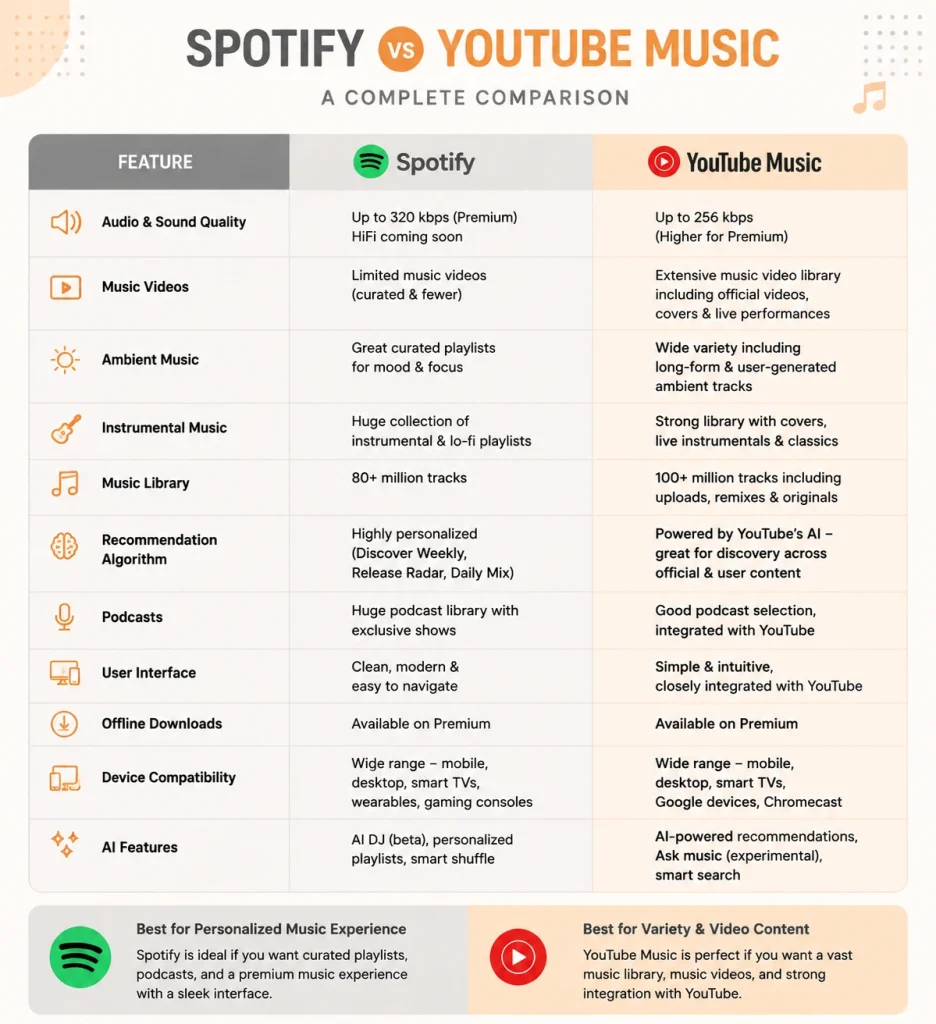
| Feature | Spotify | YouTube Music | Winner |
| Audio & Sound Quality | Consistent high quality | Varies by source | Spotify |
| Music Videos | Limited videos | Massive video library | YouTube Music |
| Ambient Music | Curated playlists | More unique mixes | Tie |
| Instrumental Music | Better playlists | More rare recordings | Tie |
| Music Library | 100M+ official songs | Songs + YouTube uploads | YouTube Music |
| Recommendation Algorithm | Superior music discovery | YouTube-based suggestions | Spotify |
| Podcasts | Excellent support | Basic support | Spotify |
| User Interface | Clean and polished | Functional but busy | Spotify |
| Offline Downloads | Smart Downloads | Smart Downloads | Tie |
| Device Compatibility | Wider compatibility | Best with Google | Spotify |
| AI Features | AI DJ & AI Playlists | Google AI recommendations | Spotify |
1. Audio & Sound Quality
- Spotify: Delivers consistent audio quality across its entire music catalog. Songs sound balanced across headphones, speakers, and mobile devices.
- YouTube Music: Official releases sound excellent, but quality can vary for live performances, remixes, and user-uploaded tracks.
Winner: Spotify
2. Music Videos
- Spotify: Includes limited music videos and artist clips but primarily focuses on audio streaming.
- YouTube Music: Lets you switch between songs and official music videos while offering concerts, lyric videos, and fan uploads.
Winner: YouTube Music
3. Ambient Music
- Spotify: Features professionally created playlists for sleep, focus, meditation, and relaxation.
- YouTube Music: Offers a wider variety of ambient mixes, nature sounds, rain recordings, and extended relaxation content.
Winner: Tie
4. Instrumental Music
- Spotify: Excels with curated instrumental playlists covering classical, jazz, piano, lo-fi, and study music.
- YouTube Music: Offers rare instrumental recordings, covers, extended mixes, and independent artist uploads.
Winner: Tie
5. Music Library
- Spotify: Provides access to over 100 million officially licensed songs along with podcasts.
- YouTube Music: Includes official tracks plus live performances, remixes, covers, fan uploads, and exclusive YouTube content.
Winner: YouTube Music
6. Recommendation Algorithm
- Spotify: Uses Discover Weekly, Daily Mixes, AI Playlists, and Release Radar to recommend new music.
- YouTube Music: Suggests songs based on your YouTube watch history and listening preferences.
Winner: Spotify
I have created a specific guide on best apps to discover new music. You should also check that.
7. Podcasts
- Spotify: Offers one of the best podcast experiences with excellent discovery, downloads, and playback controls.
- YouTube Music: Supports podcasts but lacks the advanced discovery and organization found on Spotify.
Winner: Spotify
8. User Interface
- Spotify: Features a clean, modern interface that’s easy to navigate across mobile and desktop devices.
- YouTube Music: Has improved considerably but still feels more like YouTube than a dedicated music app.
Winner: Spotify
9. Offline Downloads
- Spotify: Smart Downloads automatically save your frequently played songs for offline listening.
- YouTube Music: Supports offline downloads and Smart Downloads that update based on your listening habits.
Winner: Tie
If you enjoy offline music, Apps like VLC Media Player can be best for you. But you must have your favorite songs stored on your device.
10. Device Compatibility
- Spotify: Works with smart speakers, TVs, gaming consoles, wearables, and supports Spotify Connect.
- YouTube Music: Available on most devices and integrates especially well with Google’s ecosystem.
Winner: Spotify
11. AI Features
- Spotify: Includes AI DJ, AI Playlists, and personalized recommendations powered by machine learning.
- YouTube Music: Uses Google’s AI to recommend music based on your YouTube activity and listening history.
Winner: Spotify
Spotify vs YouTube Music Pros and Cons
Pros and Cons of Spotify
| Pros | Cons |
| Excellent music discovery and personalized recommendations | Limited music video library compared to YouTube Music |
| High-quality podcast integration | |
| Clean and intuitive user interface | |
| Strong playlist sharing and social features | |
| Spotify Connect for seamless multi-device playback |
Pros and Cons of YouTube Music
| Pros | Cons |
| Massive library of music videos, live performances, and remixes | Podcast experience isn’t as polished as Spotify |
| Excellent value with YouTube Premium | |
| Access to rare songs, covers, and unofficial recordings | |
| Personalized recommendations powered by YouTube history | |
| Smooth integration with Google’s ecosystem |
Final Thoughts
Choosing between Spotify and YouTube Music comes down to your listening habits.
If your priority is discovering new artists, enjoying high-quality playlists, listening to podcasts, and using a polished music app, Spotify remains the best overall music streaming service in 2026.
However, if you already subscribe to YouTube Premium or enjoy watching music videos, live concerts, remixes, and exclusive performances, YouTube Music delivers exceptional value by combining premium music streaming with ad-free YouTube.
For most users in the United States, Spotify offers the more complete music streaming experience. But for YouTube enthusiasts and budget-conscious listeners, YouTube Music is a compelling alternative that continues to improve every year.
People Also Ask
Is Spotify better than YouTube Music?
For most users, yes. Spotify offers better music discovery, podcast integration, social features, and a more polished user experience. However, YouTube Music is the better option for users who value music videos and already subscribe to YouTube Premium.
Which service has better sound quality?
Spotify generally provides more consistent audio quality across its catalog, while YouTube Music’s quality may vary for unofficial or user-uploaded content.
Is YouTube Music cheaper than Spotify?
If you already pay for YouTube Premium, YouTube Music provides better overall value because both services are included in one subscription. Otherwise, pricing is similar depending on the plan you choose.
Which platform is better for discovering new music?
Spotify remains the leader in music discovery thanks to personalized playlists, AI recommendations, and curated mixes that introduce listeners to new artists.
Can I transfer playlists from Spotify to YouTube Music?
Yes. Several third-party playlist transfer tools allow you to move playlists between Spotify and YouTube Music with minimal effort, making it easy to switch platforms without rebuilding your library.
Need custom app with amazing features?
Get a Quote