All webmasters make their best efforts to optimize website content through SEO strategies. Right, they should be! But you know, optimizing images is also an important factor you may be missing.
Images not only make content useful but also improve the visual appeal and user experience of a website, but if they’re not optimized correctly, they can slow down your site and hurt your search engine rankings.
That’s where Image SEO comes in. An optimized image on your site improves page load speed, boosts your visibility in image search results, and drives more organic traffic. Not sure about Image SEO?
In this guide, learn what is Image SEO, why it’s important, and how to optimize for search engines.
What is Image SEO?
Image SEO is defined as the process of optimizing the images of your website to make them highly visible in the search engine results pages.
Previously, people, including me, didn’t focus on this aspect of search engine optimization. However, recent Google updates have made it necessary to optimize the images as they play a significant role in determining the ranking of your site in the SERP.
Why is Image SEO Important?
Image SEO has gained immense importance in recent years as it is a White Hat SEO tactic. The points mentioned below are enough to understand why you should integrate it into your SEO strategy.
- Enhanced Visibility: When you optimize the images for SEO, there is a chance that they will appear in Google Images as well as in other search engine results. Hence, you will be able to receive more clicks.
- Better User Experience: Image SEO makes sure that the images on your site will load faster. Thus, it will reduce the overall loading time of your site. As a result, you will see a huge spike in the engagement rate.
- Higher Rankings in SERP: Search engines, especially Google, are now taking sites higher in the rankings, which are optimizing their images for better search engine optimization. It is because it allows Google to crawl and index them quite easily. Therefore, you should optimize your images.
- More Traffic: Most people are fond of exploring the image search results. So, if you perform Image SEO and your images appear in the search results, you can have your hands on a larger traffic that will bring huge revenue to your bank.
💡Pro Tip
Ensure your image metadata (IPTC/XMP) includes “Digital Source Type.” This helps search engines distinguish between a real photograph and an AI-generated visual, which is a major factor for E-E-A-T (Experience, Expertise, Authoritativeness, and Trustworthiness) in 2026.
How to Optimize Images For SEO? Best Tips
The following are the key techniques to optimize images for SEO. It will make your images and website search engine-friendly.
1- Choose the Right Image Format
Firstly, you have to choose the right format for your site’s images. The reason is that you have to create a balance between quality and loading time. Some of the most popular formats are:
- JPEG: Best for complex photographs where a small file size is more important than perfect crispness.
- PNG: Best for images with transparency or those requiring great detail (like screenshots with text).
- WebP: The current industry standard. It provides superior compression and quality compared to JPEG/PNG.
- AVIF (The 2026 Choice): If you want to be ahead of the curve, use AVIF. It offers even better compression than WebP (up to 30% smaller) while maintaining incredible detail. Most modern browsers now fully support this.
- SVG: Essential for logos and icons to ensure they stay sharp at any zoom level.
Among all the formats mentioned above, I am biased toward WebP because it doesn’t lower the quality much while maintaining the file size according to the Image SEO requirements.
While your opinion may be different, as the JPG vs PNG battle is quite extensive, I would appreciate it if you would discuss them in the comments.
2- Proper File Name of the Image
The next important Image SEO technique is that you should give your image file a proper name. Image file name matters for SEO as it signals to the search engine what the image is about.
It can be a description or simply the keyword of your content. In this way, search engines can better understand the context and content of your image and make it appear in the SERP. The general names like IMG_1234.jpg, etc., are no longer effective in SEO.
Here are examples of wrong and a right image file names:
- ❌ IMG_1234.jpg
- ✅ Samsung-s21-ultra-camera-design.jpg
3- Alt Text
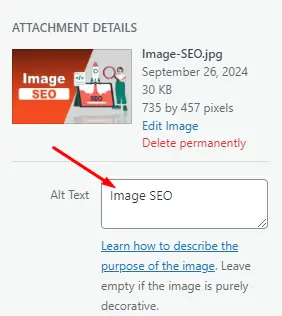
Alt Text is one of the most important techniques of Image SEO as it provides a textual description of what is inside your image. You can provide concise, descriptive alt text for each image to help search engines understand its content.
Ultimately, it improves the accessibility and SEO of your image makes the search engines understand it in a better way. Moreover, it also makes it easier for people with disabilities to grab the details. Therefore, Google is now preferring it.
4- Image Size and Compression
The larger the size of the image, the more negative impact it will have on your website. Heavy images take time to load, and ultimately, users will not be able to see them during their stay on your site.
Therefore, you must compress the size of the images and make sure they are under 100 KB. Hence, you can make sure that the images have an appropriate size to display in the context of the content.
Some popular tools that help you to compress the size of the image while maintaining the quality:
- TinyPNG
- ImageOptim
- Squoosh
5- Create Unique Images
One of the best practices for enhanced Image SEO is that you must create unique and new images for your content. While it is easy to download stock photos and add them to your site, it will not capture the attention of users as well as search engine algorithms.
On the other hand, when you generate unique and high quality images, they will engage the users which will ultimately deliver SEO benefits. As Google is also promoting genuine content, you should focus on making new images.
6. AI Imagery vs. Information Gain
In 2026, search engines like Google are flooded with generic AI-generated images. To rank today, your images must provide “Information Gain.” This means your visuals should offer new value that a prompt-generated image cannot.
For this purpose, instead of using a generic AI “man at a computer,” use a custom annotated screenshot, a unique data chart, or a real-life photo. If you do use AI, heavily edit it to include your brand’s specific context.
Google’s latest “Helpful Content” updates prioritize “Human-in-the-loop” visuals over raw AI outputs.
7- Optimize Image Titles and Captions
The next important thing is that you have to optimize the title and caption of the image. While ALT text and file name are important, you can also use the primary as well as secondary keywords in the caption to enhance the Image SEO.
Nevertheless, you have to be careful regarding spam activities. Instead of using the keyword directly, you should provide some authentic information about what you are representing with the help of it.
8- Visual Search Optimization
Visual search is no longer a secondary feature. Now, with the dominance of Google Lens and SGE (Search Generative Experience), it is a primary traffic driver. To optimize for this:
- Implement Image Schema: Use ImageObject structured data. This tells search engines exactly what the image is, who created it, and its license status.
- Contextual Relevance: Place images near the most relevant text. In 2026, search algorithms use “Semantic Proximity.” It means they look at the 20-30 words surrounding an image to determine its ranking for complex queries.
- High Contrast: Ensure your subject is clear. Modern AI vision sensors prioritize high-contrast, high-resolution subjects for visual “shopping” and “discovery” results.
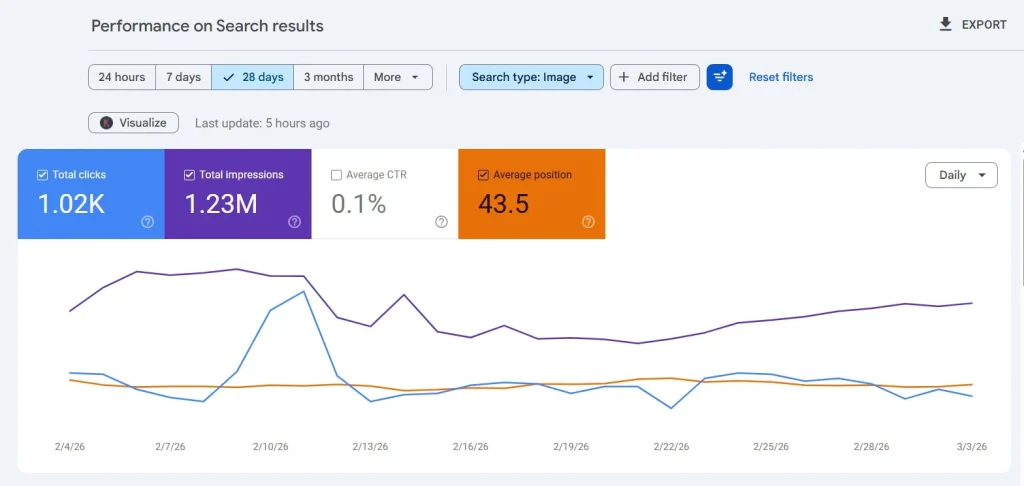
WebTech Solutions has implemented these tactics on its core project, Nogentech.org, and the results are tremendous. Between Feb 4, 2026, and March 3, 2026, it has gained 1.23 million impressions and 1.02k clicks.
9- Use CDN for Image Delivery
A Content Delivery Network, commonly known as CDN, can be the best possible option for speeding up the delivery of images. It brings the image data to the servers that are close to the users.
In this way, you can reduce the loading time and provide a brilliant user experience to your organic audience. Further, the associated improvement in the engagement rate will take your site to the top of the search results for specific queries.
10- Enable Lazy Loading
Lazy loading is generally defined as preventing the images from loading until they need to be viewed. For example, if you have added 50 images to your content, lazy loading will allow only the top 4 or 5 images to show completely.
The rest of the images will be blanked. However, when someone scrolls down, they will appear in the content. This Image SEO strategy is widely helpful in improving the loading speed of your website and its subpages.
11- Use the ‘Srcset’ Attribute for High-DPI Displays
With the variety of high-resolution mobile devices in 2026, which serve a single image size is no longer enough.
Use the srcset attribute in your HTML. It allows the browser to automatically choose the smallest possible image version that still looks crisp on the user’s specific screen (e.g., Retina vs. standard displays). Hence, it improves your “Largest Contentful Paint” (LCP) score in Core Web Vitals.
12- Implement Image Caching
Next, you have to use the potential of image caching as it saves the images on the devices of the users. Ultimately, when they revisit your site, there will be no loading time. Hence, it engages the user. Also, it will improve the overall performance score of a website.
Final Thoughts
These are the details about Image SEO and the best strategies to optimize your images for search engine results pages. I have mentioned all the tactics that I am following currently and getting the desired results.
It is necessary for you to understand this guide and follow the steps in a precise manner. In this way, you can improve the search engine ranking of your site alongside getting more traffic and organic audience.
Create unique images for every article and optimize them for visual search by making them clear and relevant to the topic. These are the best practices for Image SEO.
Need custom app with amazing features?
Get a Quote