
An article can have the right keywords, a well-written introduction, and a logical heading structure but still fail to answer what readers actually want to know.
Before publishing SEO content, you have to review 5 areas:
Search Intent
Factual Accuracy
Content Gap and Missing Information
These checks help editors identify problems that may affect the article's usefulness before readers encounter them. In this guide, I will provide you with a complete step-by-step procedure to review content before publishing so you can achieve higher SERP rankings and more AI citations.
How to Review SEO Content Before Publishing?
Consider an article comparing ecommerce CRM software. Someone searching for the best CRM for an online store needs more than a list of products. They need to understand:
Compatibility
Pricing
Automation features
And which platform fits their business
This example shows how to evaluate those details and decide whether an article is ready to publish.
1. Confirm the Search Intent Before Editing
Search intent explains what someone wants to accomplish when entering a query into Google.
For example, "best ecommerce CRM software" indicates commercial investigation. The reader is comparing available solutions rather than looking for a basic definition of customer relationship management.
An article targeting that query should answer:
Which CRM platforms work with ecommerce stores?
What distinguishes each option?
Which products integrate with Shopify or WooCommerce?
What are the pricing models and potential additional costs?
Which features matter for customer retention, sales automation, and reporting?
If the article primarily explains what CRM software is, it may be informative but poorly matched to the intended query.
WebTech Solutions’ Trick That Will Help You Match the Article Format to the Query
Search query | Search intent | Appropriate content |
What is ecommerce CRM? | Informational | Definition, functions, examples |
Best ecommerce CRM software | Commercial investigation | Product comparisons and recommendations |
HubSpot vs Zoho CRM | Comparison | Features, pricing, limitations |
How to integrate CRM with Shopify | Instructional | Setup process and requirements |
Ecommerce CRM pricing | Commercial investigation | Subscription costs and plan differences |
Before changing an article's structure, examine relevant Google search results. Look at the questions being answered, the type of information presented, and whether the results primarily contain tutorials, comparisons, product pages, or definitions.
The purpose isn't to reproduce competing articles. It's to understand the reader's expectations and determine what useful information your article can contribute.
2. Examine a Published Ecommerce CRM Comparison
A practical reference is NogenTech.org's article, 12 Best Ecommerce CRM Solutions for Common Online Store Challenges.
The guide compares CRM products based on ecommerce requirements, including customer retention, marketing automation, and sales management.
Its product selection includes HubSpot, Klaviyo, Omnisend, Zoho CRM, and Pipedrive.
These platforms address different business needs, which makes them useful examples for reviewing a comparison article.
What Should an Editor Evaluate?
CRM Platforms | Relevant Evaluation Areas | What Needs Verification? |
HubSpot | CRM and marketing workflows | Plan restrictions, ecommerce integrations |
Klaviyo | Customer retention and email marketing | Store compatibility, contact-based pricing |
Omnisend | Ecommerce marketing automation | Automation limits, supported channels |
Zoho CRM | Customer management and sales processes | Integration options, feature availability |
Pipedrive | Sales pipeline management | Ecommerce suitability, available integrations |
These are evaluation areas, not claims that each platform has been independently tested.
For example, an article recommending Klaviyo should explain which ecommerce businesses may benefit from its customer segmentation and marketing capabilities. It should also identify pricing considerations and integration requirements.
An editor should verify those details using current product documentation rather than relying on previously published descriptions.
The same principle applies to every software comparison:
“Explain the product's relevance, then substantiate the recommendation.”
3. Identify Information Missing From the Draft
A content gap exists when an article leaves out information readers need to understand a subject or make a decision.
In software comparisons, gaps often involve costs, compatibility, limitations, or differences between similar products.
Consider this description:
"Platform A is a great CRM for ecommerce businesses with advanced automation and useful integrations."
The statement offers little decision-making value. It doesn't explain who should use the product, what its automation supports, or which integrations are available.
A more useful version would be:
"Platform A may be worth considering for Shopify stores that need automated customer follow-ups. Before subscribing, check whether abandoned-cart workflows are available on your chosen plan and whether customer data synchronization requires an additional integration."
The revised example identifies a business use case and gives readers specific details to investigate. It is illustrative, not a verified product recommendation.
Questions that Reveal Content Gaps
For an ecommerce CRM article, ask:
Can readers distinguish the recommended platforms?
Are important pricing restrictions explained?
Does the article address integration requirements?
Are product limitations included alongside benefits?
Can readers identify which solution fits their business size?
Are the recommendations supported by verifiable information?
Not every possible detail belongs in the article. Include information that directly supports the reader's decision.
4. Verify Product Claims and Sources
Software content requires particular attention to accuracy because features, subscription plans, and integrations change.
A pricing figure that was correct 6 months ago may no longer apply. Similarly, a feature advertised on a product's website may only be available through a paid add-on.
Review the following information before publication.
a) Pricing and Subscription Plans
Check official pricing pages for monthly and annual rates, free-plan restrictions, usage limits, and additional fees.
Where pricing varies by contact volume, users, or store activity, explain those variables instead of presenting a single price as universally applicable.
b) Features and Integrations
Confirm whether the software offers a feature natively or through a third-party integration.
For instance, ecommerce automation may depend on a supported store connection, subscription tier, or additional application.
c) Product Limitations
A useful comparison explains trade-offs.
A platform might be suitable for a small store but become expensive as its customer database grows. Another may offer detailed sales pipeline management without providing the ecommerce marketing features a retailer needs.
These distinctions matter more than describing every product as a strong choice.
d) Evidence and Editorial Transparency
Use official documentation, product changelogs, pricing pages, and relevant technical references to verify factual claims.
If the writer has tested a product, describe the testing process and include relevant observations or screenshots.
If the article is based on research rather than hands-on testing, make that distinction clear.
Google's people-first content guidance encourages original information, reliable sources, and evidence of experience where relevant.
5. Check Content Structure and Readability
A comparison article should help readers locate information without reading every section from beginning to end.
For an ecommerce CRM guide, a useful structure includes:
A short explanation of who the comparison serves.
A summary table showing products and primary use cases.
Individual product evaluations.
Pricing, integration requirements, and limitations.
Selection advice based on business needs.
a) Make Headings Specific
Compare these headings:
Generic: Best CRM Option for Your Business
Specific: CRM Software for Shopify Customer Retention
The second heading establishes a clearer subject and helps readers decide whether the section addresses their needs.
Headings should reflect the content underneath them. They don't need to contain the primary keyword repeatedly.
b) Remove Statements that Add No Information
During editing, remove repeated product introductions, unsupported superlatives, and paragraphs that restate earlier points.
For example:
"This CRM offers many helpful features that can help businesses improve their customer management."
A more informative sentence would identify the actual function:
"The CRM organizes customer records and sales activity, allowing staff to review previous interactions before contacting a buyer."
Use the second version only when the described functionality has been verified. Clear descriptions improve comprehension without adding unnecessary length.
6. Use Content Analysis Software Where It Adds Value
Manual editorial review is necessary for verifying facts, assessing recommendations, and deciding whether an article satisfies its intended audience.
Content analysis software can support that process by identifying issues editors may want to investigate.
For example, the NogenTech content optimizer evaluates submitted content across search intent, entity coverage, information gain, E-E-A-T, internal linking, AI citation readiness, and content structure.
Its analysis provides a readiness score and recommendations that can inform editorial decisions.
A Practical Review Process
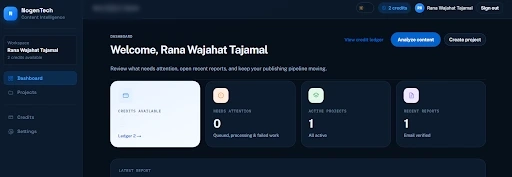
Open Nogentech’s Tool: After signing up, click on Analyze Content.
Define the Target Query: Establish the reader's problem and the article's purpose.
Choose Content Type: Next, you have to choose the content type, whether it is informational, review, or other.
Choose Targeted Country: Choose the country in which your target audience is present.
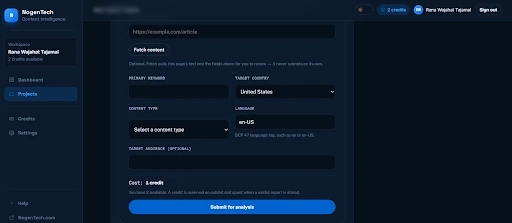
Prepare and Add the Draft: Include the comparison criteria, product information, and supporting references.
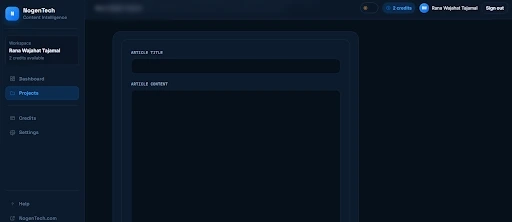
Run a Content Analysis: Review potential gaps in topic coverage, structure, and search intent alignment.
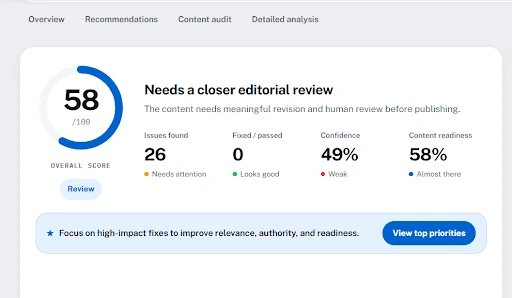
Evaluate the Findings: Determine which recommendations address genuine reader needs.
Revise and Verify: Make justified improvements and manually confirm factual accuracy.
An automated score should not determine whether an article is ready for publication.
A draft can receive a favorable assessment while still containing incorrect prices or unsupported product claims. Conversely, a recommendation to add more information may not be appropriate when that information falls outside the reader's intent.
Editors should use analysis results as supporting evidence, not as instructions that must always be followed.
7. Complete the On-Page SEO Review
Element | What to review |
Title tag | Describes the page accurately and distinguishes it from similar pages |
Meta description | Summarizes the article without exaggerated claims |
H1 and H2 headings | Organize the content around relevant questions and sections |
Internal links | Connect readers to genuinely useful related resources |
External references | Support claims with reliable sources |
Images and alt text | Provide useful context and describe meaningful images |
Canonical URL | Identifies the preferred URL where duplicate versions exist |
Structured data | Matches visible content and follows Google's eligibility requirements |
Mobile layout | Keeps tables, screenshots, and text readable on smaller screens |
Once the content itself is accurate and useful, check the elements that help readers and search engines understand the page.
Review Internal Links for Relevance: An ecommerce CRM comparison might naturally link to articles explaining customer segmentation, marketing automation, or ecommerce integrations. Avoid adding unrelated links simply because the target page needs more internal links. Descriptive anchor text should explain what readers can expect from the destination.
Don't Confuse Optimization With Completeness: Adding keywords to headings or changing a meta description won't resolve missing product information. Complete the substantive editorial review first. Technical and on-page checks should support the article, not substitute for its usefulness.
8. Approve, Revise, or Return the Draft
The final review should produce an editorial decision.
Decision | Criteria |
Approve | Search intent is satisfied, essential information is verified, and no significant issues remain |
Revise | The article is useful but needs specific corrections or additional information |
Return for rework | The article targets the wrong intent, lacks adequate evidence, or fails to answer the main question |
For a CRM comparison, incorrect pricing, misleading feature claims, or unsupported recommendations should be resolved before publication.
Minor wording preferences shouldn't delay an otherwise accurate and useful article indefinitely.
WebTech Solution’s Final SEO Content Review Checklist
Use this checklist before approving a draft:
The article addresses a specific search intent.
The introduction establishes the reader's problem.
Essential questions are answered without unnecessary repetition.
Product claims and important facts are verified.
Comparisons explain meaningful differences and limitations.
Sources and testing claims are transparent.
Headings and tables make information easy to locate.
Internal links provide relevant supporting information.
Title tags, metadata, images, and technical settings are checked.
The article helps readers complete their intended task.
Final Thoughts
An effective SEO content review starts with the reader's needs, not a keyword count or optimization score.
The ecommerce CRM example illustrates the difference. Someone comparing software needs accurate product information, meaningful distinctions, pricing context, and an explanation of which solutions may suit their business.
Editors should verify those details, address important information gaps, and remove material that doesn't contribute to the decision.
Content analysis software can support the review, but factual accuracy and editorial judgment remain essential.
The article is ready when it provides reliable answers to the questions its intended readers came to solve.
People Also Ask
What is an SEO content review?
An SEO content review evaluates whether an article satisfies search intent, provides accurate information, covers relevant questions, and follows appropriate on-page SEO practices.
How is an SEO content review different from a content audit?
A content review evaluates an individual draft or page. A content audit typically examines multiple published pages to assess performance, quality, relevance, and opportunities for improvement.
Can content optimization tools improve Google rankings?
They can help identify content issues and support better editorial decisions. However, using a tool or achieving a particular content score does not guarantee higher rankings.
How often should software comparison articles be reviewed?
Review them when significant product changes occur, particularly changes to pricing, features, integrations, or availability. The appropriate schedule depends on how frequently the information changes.